
What you type, what Claude asks, what you get
Claude reads your agents, then grills the riskiest ones one question at a time and pushes back when the code says otherwise. On day one you get a map of every agent and a risk register that predicts which ones will fail. Thirty days of logs show whether it was right.
A Claude Code team that already has agents
The team's repository claims-service/ has 25 Python agents in src/agents/, one file per agent, prompts in prompts/, the routing graph in src/graph.py, an approvals queue with escalation rules in config/approvals.yaml, a withdrawal handler, and logging to stdout. Nobody describes the agents to Claude. The code, prompts, config and git history describe them, and the interview finds what the code cannot show.
Install the plugin
/plugin marketplace add ORG/juggernaut-harness /plugin install juggernaut-harness@juggernautStart the audit
/juggernaut-harness:audit ./claims-serviceClaude reads the repository before it asks anything.
ClaudeI read 31 files and the git history. Here is what I found:
- 25 model calls in
src/agents/, each with a prompt file (27 prompt files, two of them shared house rules). - A routing graph with 10 decision points, 4 places where agents run at the same time, and 7 places where work goes back to an earlier step.
- 10 places where the flow waits for a person, from the approvals queue and its config.
- 7 calls to outside systems and one rule-based check.
- A withdrawal handler that can stop a claim at any point.
How deep should we go? A quick audit is about 12 questions and 10 minutes and gives you the map and the obvious gaps. A deep audit is about 50 questions and 45 minutes and goes agent by agent through the riskiest ones, which is where weak agents get found.
Recommended: deep, because these agents decide payouts and write regulated letters.
YouDeep.
ClaudeFrom the code, these seven agents carry the most risk. I will grill them one at a time, in this order. The other 18 get a confirmation table at the end.
- Compliance reviewer: its prompt asks it to review the letter and also return a corrected letter, and nothing checks what it returns.
- Letter writer: it writes regulated letters, its prompt changed three times in six weeks, and no test references it.
- Damage estimator: it drives the payout, runs on Opus 5.5 for an extraction job, and has no fallback in the code.
- Settlement calculator: it drives the payout, and its reviewer uses the same model family.
- Exclusions finder: downstream code parses its output as JSON, but there is no schema and nothing validates it.
- Claim file summarizer: it runs on GPT-6 Astra with high thinking for a summary.
- Coverage analyst: a wrong coverage call is the most expensive mistake in the process.
- 25 model calls in
Process questions
Ten questions about the process as a whole come first. Three of them:
ClaudeI grouped the steps into six roles: Intake, Coverage, Investigation, Settlement, Customer comms and Finance. Does that match how your team talks about the process?
Recommended: yes.
YouYes.
ClaudeYour code sets timeouts but no target times. Should each agent's SLA be about half its timeout? The damage estimator has a 120-second timeout, so its SLA would be 60 to 70 seconds.
Recommended: yes, and tell me any you want tighter.
YouYes. Damage estimator is 70 seconds.
ClaudeYour approvals config escalates denial sign-off after 24 hours, SIU after 48 hours and adjuster review after 24 hours. For denial and SIU the work stays with the same person and a notice goes out. For adjuster review it is reassigned. Is that right?
Recommended: yes.
YouCorrect.
The other seven cover the outcome, daily volume, payment failures, withdrawals, cost limits (set from real usage later, with the file summarizer capped at three cents a call), where golden inputs live today (nowhere for most agents), and logging.
Grilling the damage estimator
ClaudeWhat does a bad estimate from the damage estimator look like? Give me one you have actually seen.
Recommended: the last estimate an adjuster corrected.
YouLast month it priced a water heater at retail instead of our parts list. The payout was $640 too high.
ClaudeHow was that caught?
YouThe adjuster caught it in review.
ClaudeAdjuster review only happens on claims over $5,000. Under that, the estimate goes straight to the settlement calculator, and the settlement reviewer's prompt compares the total against the policy limits, not the line items. So on most claims a wrong line item reaches the payout unchecked. Is that right?
YouYes. I hadn't thought about that.
ClaudeWhich inputs make it struggle?
YouLong invoices, anything over about ten pages. And photos where you can't tell how big the damage is.
ClaudeYour code sends the whole invoice in one call with
max_tokens: 2500. A twelve-page invoice can need more than 2,500 tokens of line items, so the list gets cut off. Has it ever been tested on a long invoice?YouNo.
ClaudeWhy Opus 5.5? This is an extraction job.
YouI don't know. It was set up that way.
ClaudeI'll record that as unanswered. What happens when it fails or times out?
YouIt retries twice and then the claim stops.
ClaudeSo there is no fallback: no smaller model and no hand-off to a person. Should a failed estimate go to an adjuster instead of stopping the claim?
Recommended: yes.
YouYes.
ClaudeHow many claims with known-correct estimates could you give me as golden inputs?
YouTwo right now.
ClaudeDamage estimator: readiness 55, at risk. A wrong line item reaches the policyholder without a full check, it runs a premium model on an extraction job, and it has no fallback today. The adjuster hand-off goes on the fix list. Test to add: five long invoices with known line-item totals.
Grilling the letter writer
ClaudeWhat does a bad letter look like?
YouThe worst one dropped the appraisal-rights disclosure. That's a regulatory problem.
ClaudeWhen does that happen?
YouWhen the payout has more than one adjustment.
ClaudeHow do you test a new version of its prompt before it goes live?
YouWe read a couple of letters and ship it.
ClaudeGit shows the prompt changed three times in the last six weeks, and nothing in
tests/references it. So every version went live untested on a regulated letter. How many letters with known-correct disclosures could you give me?YouNone saved. We could pull some.
ClaudeLetter writer: readiness 58, at risk. Its prompts ship untested, its output reaches the policyholder, and it has no golden inputs. The disclosure check and the compliance reviewer catch some mistakes, but the next untested prompt change is the risk. Test to add: five letters with two or more adjustments in three states.
Grilling the compliance reviewer
ClaudeIts prompt asks it to review the letter and to return the corrected letter in full. Is it a reviewer or an editor?
YouBoth, I guess.
ClaudeWhen it edits, who checks its edits?
YouNobody. Its version is what gets sent.
ClaudeSo wording legal never approved can reach a policyholder. Has that happened?
YouLegal flagged one letter last quarter. We assumed it was the letter writer.
ClaudeThe prompt also asks it to check word count, headings and format. Code can check those exactly and for free. Who owns this prompt?
YouI'm not sure.
ClaudeCompliance reviewer: readiness 19, at risk, the lowest in the system. It does two jobs, nothing checks its edits, its prompts ship untested, and nobody owns it. Fix list: return fixes instead of rewriting, move the format checks to code, and assign an owner.
The other grilled agents
Agent What the team said What Claude recorded Settlement calculator It applied depreciation twice on two replacement-cost claims this quarter. The current prompt was checked on two claims. Nobody knows how depreciation rules differ by state. Readiness 79, watch. Tested on few cases, a reviewer from the same model family, one unanswered question. Exclusions finder It misses endorsements that exist only as scanned PDFs. The coverage analyst uses its list without checking it. Readiness 70, watch. Nothing checks it, and a miss reaches the policyholder. Claim file summarizer Nobody knows who reads the summary or why it runs on GPT-6 Astra. QA samples about 5% of closed claims. Readiness 65, watch. A premium model on a summary, no golden inputs, two unanswered questions. Coverage analyst Conflicting endorsements are routed to the specialist as unclear. Twelve golden policies run before every prompt change. Readiness 100, ready. This is what a well-run agent looks like. For the other 18 agents, Claude shows one table of what the code says about each (job, model, inputs, output, schema, reviewer, timeout, retries) and the team confirms it, correcting two rows. The interview took 52 questions and about 45 minutes.
Turn on recording
Everything so far comes from the code and the interview. Health, Runs and Optimize need something the code cannot provide: a record of what each agent actually does on real claims. The agents do not write one yet, and Claude has no access to production of its own, so this step settles two things: how the record gets written, and how it reaches someone who is allowed to read it.
ClaudeHealth needs a record of every claim, and your agents do not write one yet. Where does the claims service run in production, and where do its logs go?
YouAWS ECS. Logs go to CloudWatch.
ClaudeThen I will add the harness recorder: one Python file with no dependencies. It writes one JSON line per event to stdout, which CloudWatch already collects. It records which agent ran, the model, token counts, timing, status, which way each decision went and each review verdict. It never records claim text, prompts or letters, and nothing goes to Juggernaut. Add it?
Recommended: yes.
YouYes.
ClaudeI instrumented three places:
src/agents/base.pyfor every agent call and its token usage,src/graph.pyfor every routing decision and review verdict, andsrc/approvals/queue.pyfor when a person picks up and finishes a task. The run id is your internal claim id, which is opaque. Next question: can you read the claims service logs in CloudWatch yourself?YouNo. The platform team owns production logging.
ClaudeThen the events have to reach you through them. Because the events hold metadata only, no claim text or customer details, this is usually an easy approval. From simplest to most convenient:
- They export the harness events when you ask and send you the file.
- They copy the harness events every day to a bucket you can read.
- They give you read-only access to the filtered events in CloudWatch.
Recommended: the daily copy to a bucket, so health is one command for you and no extra work for them after setup.
YouThe daily copy. Can you write the request?
ClaudeDone:
.harness/request-for-log-owner.mdsays what to copy (lines whereworkflow_idisclaims-settlement), how often, who needs read access, and shows a sample line so they can see there is no customer data in it. One thing to be clear about: I cannot reach CloudWatch, the bucket or any of your servers. Getting the logs is always a manual step you do. Whenever you want a health check, download the files into.harness/runs/with your read-only access, then run/juggernaut-harness:health. The command isaws s3 sync s3://claims-harness-events .harness/runs, saved in.harness/config.yamlso you do not have to remember it.Two days later the bucket exists. The team runs one claim through staging, the user downloads its events into
.harness/runs/, and Claude checks them.check-logsreads the log files and compares them with the blueprint: how many runs and events it found, which agents reported, which did not, whether every model call carried token counts, and whether any step ids are missing from the blueprint.python harness.py check-logs .harness/harness.yaml --runs .harness/runs 1 file(s), 88 events for claims-settlement, 1 runs, from 2026-09-24 to 2026-09-24 agents reporting: 17 of 25 not seen yet (paths not taken, or not instrumented): Denial letter writer, SIU referral writer, SIU escalation notice, Translator, Reminder writer, Dispute summarizer, Payment exception handler, Withdrawal confirmation model calls: 17, all with token countsClaudeThe recording works. 17 of 25 agents reported, every model call with token counts. The other 8 sit on paths this claim did not take: denial, SIU, translation, reminder, dispute, payment exception and withdrawal. Health will have data from the day this ships to production.
Claims service on ECSThe recorder writes one line per eventCloudWatch keeps the linesThe platform team's daily copy lands in a bucketYou download the files into .harness/runscheck-logs, then the consoleWhat Claude produces on day one
File What it holds .harness/harness.yamlThe blueprint with every interview answer recorded per agent .harness/risk-register.mdReadiness for all 25 agents: 3 at risk, 9 to watch, 13 ready, with reasons and the test to add for each .harness/audit-report.mdMissing controls and the fix list, including the adjuster hand-off, the compliance reviewer changes and the drafted schema .harness/harness.mdThe process spec, one card per step .harness/harness.bpmnBPMN 2.0 for bpmn.io or Camunda Modeler .harness/harness.htmlThe console: map, process cards with readiness, and a dry-run forecast src/harness_recorder.pyand three edited filesThe recorder and its calls, shown as a diff for review .harness/config.yamlThe download command the user runs to copy the logs from the bucket, saved so nobody has to remember it .harness/request-for-log-owner.mdWhat to copy, how often, who needs access, and a sample line showing there is no customer data Agent Readiness Biggest reasons Compliance reviewer 19, at risk Prompts ship untested; nothing checks its edits; two jobs Damage estimator 55, at risk A wrong line item reaches the policyholder; premium model on extraction; no fallback Letter writer 58, at risk Prompts ship untested on a regulated letter; no golden inputs Claim file summarizer 65, watch No golden inputs; premium model on a summary Exclusions finder 70, watch Nothing checks its output; a miss reaches the policyholder Settlement calculator 79, watch Tested on few cases; reviewer from the same model family 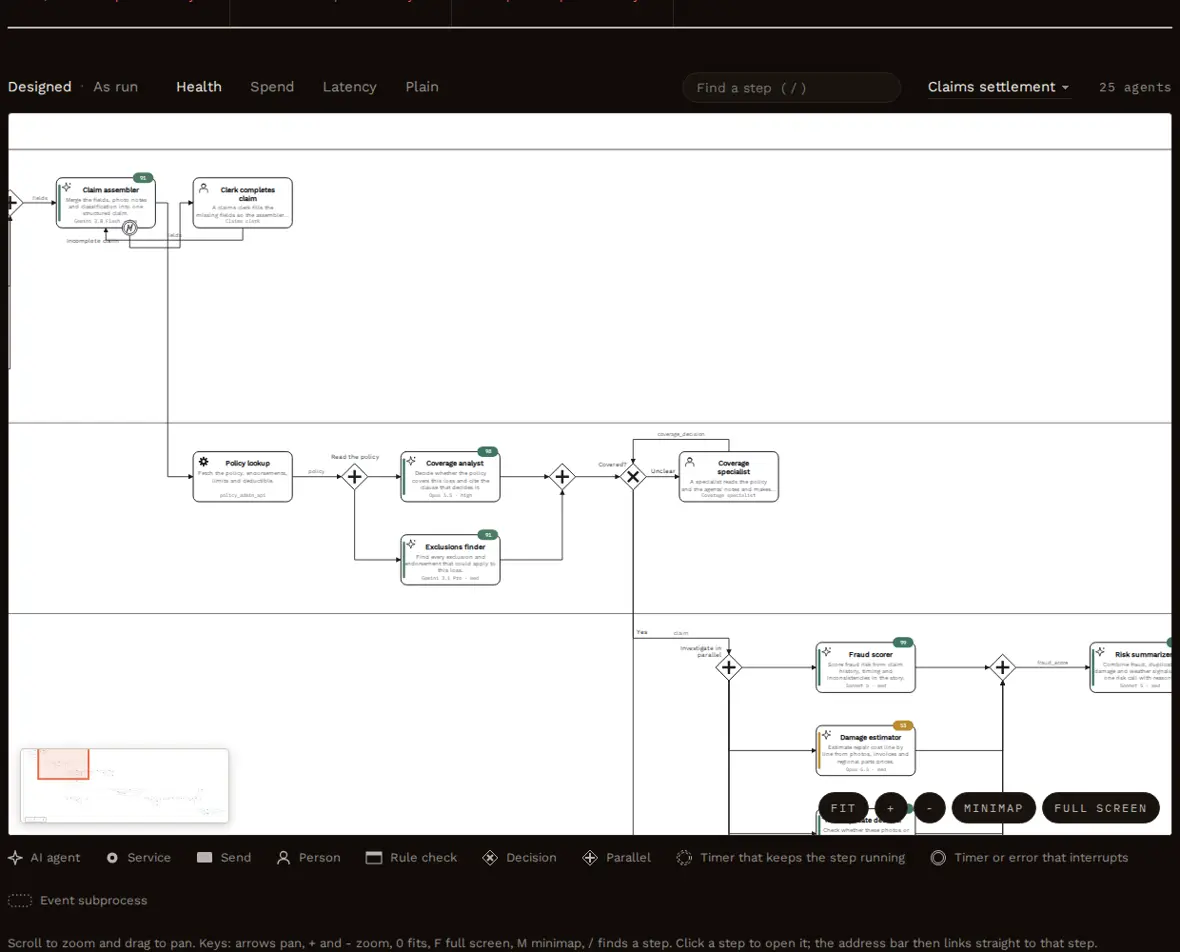
The map Claude draws from the code: lanes, agents with their jobs, parallel splits, decisions and loops back. Thirty days later: which agents are slipping?
The recorder shipped with the next release on September 25. Every claim since has been written to CloudWatch and copied to the bucket each night by the platform team's job. Claude cannot reach either one, so the health check starts with the user getting the logs.
/juggernaut-harness:healthClaudeI cannot reach CloudWatch, the bucket or any of your servers, so I need the logs on this machine first. Download the last 30 days into
.harness/runs/with your read-only access, using the command saved in.harness/config.yaml:aws s3 sync s3://claims-harness-events .harness/runs. If you cannot run it, ask the platform team for the files, or drop them here. Tell me when they are in place.YouDone. The files are in .harness/runs.
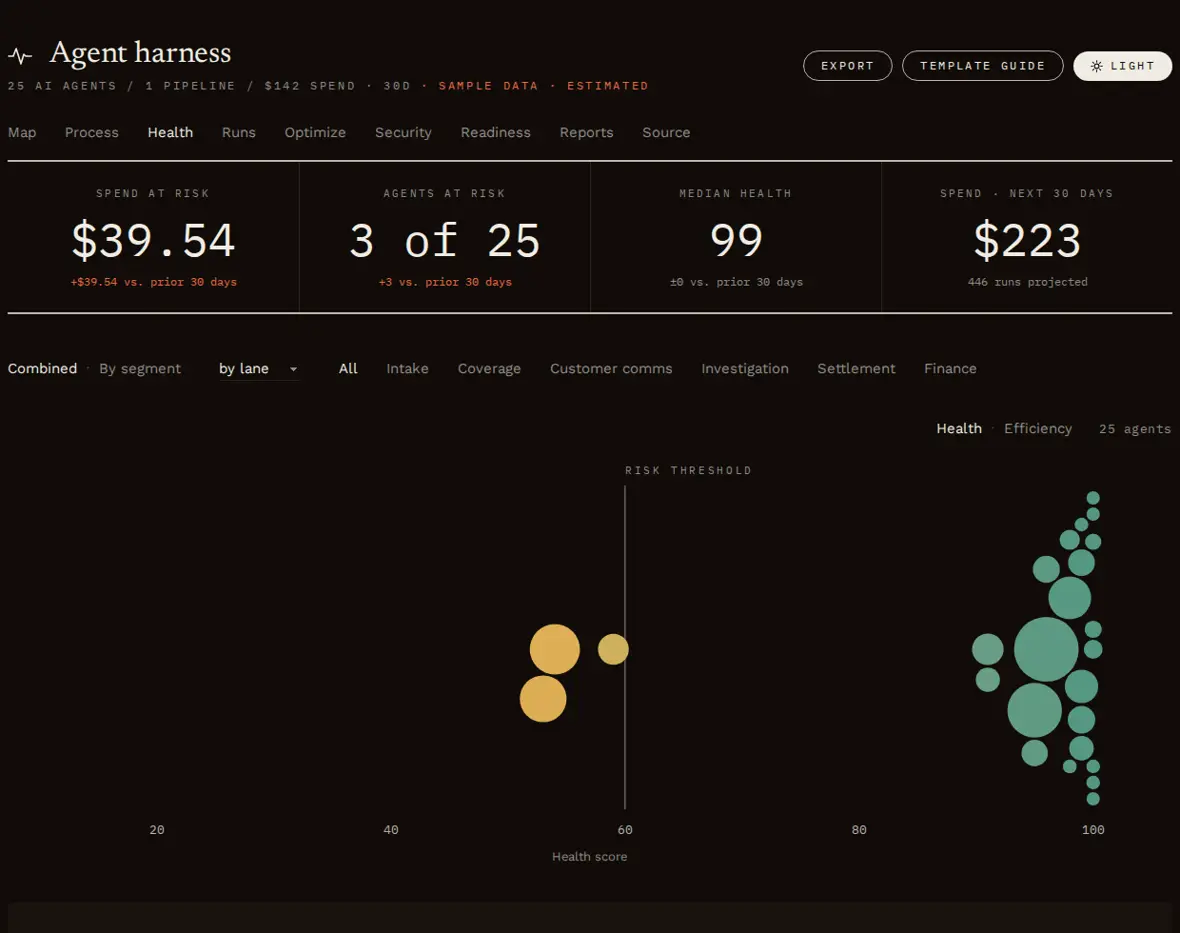
ClaudeI checked the files: 414 claims and 55,083 events over 30 days, with all 25 agents reporting. Three of 25 agents are below the threshold.
- Damage estimator, 53. It is timing out: p95 latency is 231 seconds against its 70-second SLA, and 32% of attempts are retried. It breaks its output schema on 4.7% of calls.
- Letter writer, 54. It fell from 96 after prompt v5 went live on October 5. The compliance check now sends its letters back on 79% of decisions, up from 21%.
- Settlement calculator, 59. It fell from 91 after prompt v3 went live on October 12. Its reviewer now passes only 61% of its payouts.
The risk register flagged all of these on day one. The damage estimator and the letter writer were at risk. The settlement calculator was on watch for thin testing, and its v3 shipped without the golden claims the register asked for. The compliance reviewer is rewriting letters, the exclusions finder breaks its schema on 8.4% of calls, and the claim file summarizer is 25% of all agent spend.
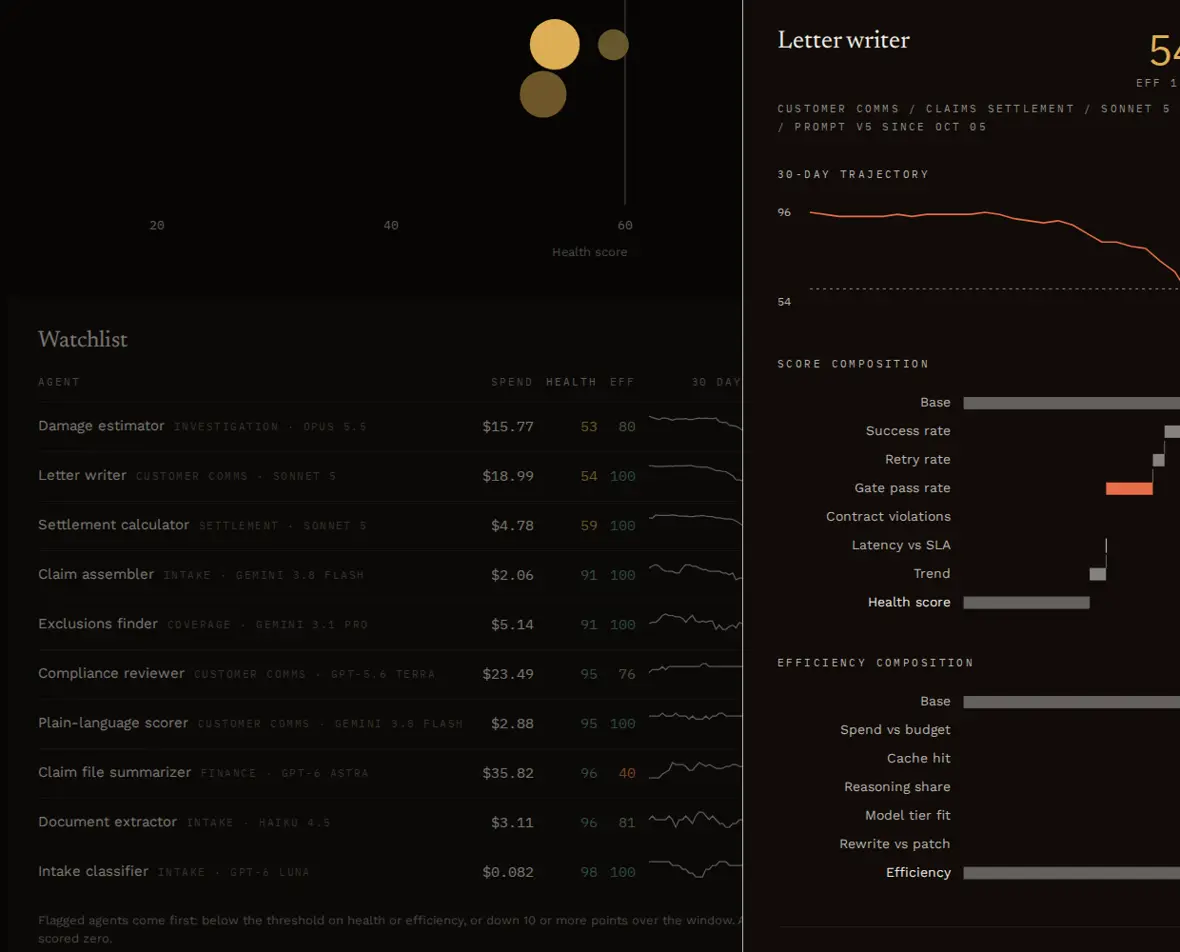
The Letter writer's drawer: health fell after prompt v5, and the biggest penalty is how often its letters get sent back. What should we fix first?
/juggernaut-harness:optimizeClaudeThe top findings, with estimated savings per claim:
- Claim file summarizer: a summary step on GPT-6 Astra. Move it to a fast model. About $0.084 per claim, plus $0.017 from lowering its thinking.
- Letter writer: the compliance loop sends it back on 79% of decisions since prompt v5. Fix the letter writer before the reviewer, since every pass reruns both. About $0.048 per claim.
- Compliance reviewer: it rewrites the whole letter instead of returning fixes. About $0.027 per claim.
- Damage estimator: timing out on Opus 5.5 for an extraction job. Test Sonnet 5, which saves about $0.019 per claim.
- Settlement calculator: worse since prompt v3. Run the golden claims against v2 and v3 and roll back if v3 loses.
Every model or prompt change needs the measured test first: rerun three to five golden claims on the new setting and compare pass rates, schema violations and a human read.
YouRun the golden claims for the letter writer on v4 and v5.
Claudev4 passed compliance on 5 of 5 golden claims and v5 on 2 of 5. I recommend rolling back to v4. Want me to change the prompt reference in
harness.yamland the agent code?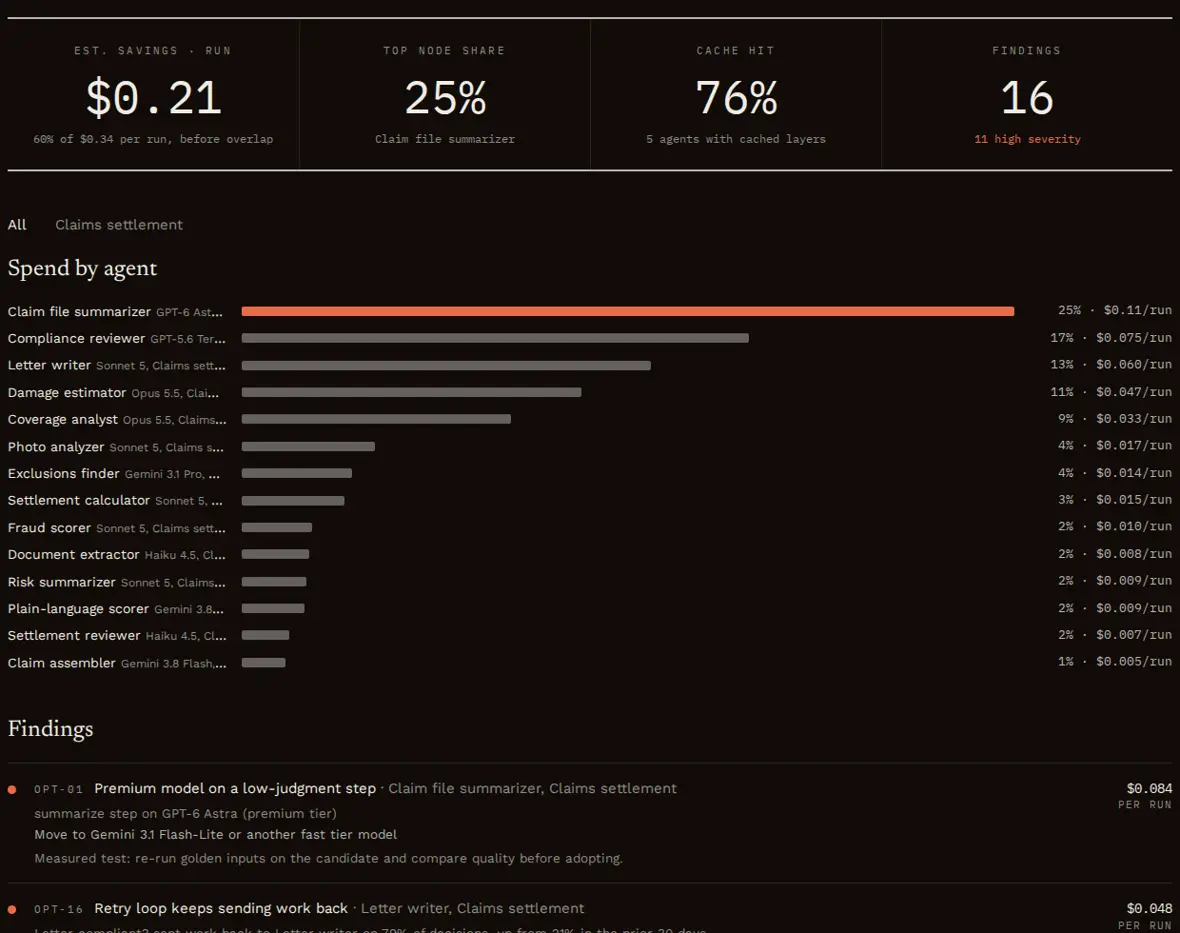
The Optimize view ranks every finding with its evidence and estimated saving.
Designing from scratch in Claude.ai or Cowork
The user has no agents yet. They add the skill file in their Skills settings and start a chat. They give Claude their process knowledge in answers and a few sample claims, and no files. The grill still happens, in the future tense, and it changes the design.
The process
YouUse Juggernaut Harness to design an agent pipeline that settles property damage claims.
ClaudeQuick or deep? Deep grills each agent before it exists, which is where the design gets its checks.
Recommended: deep, because these agents will decide payouts.
YouDeep.
ClaudeWhat should come out the other end, and how will you know it is good?
Recommended: an accepted settlement paid within 2 business days, or a clean denial or fraud referral, with every letter passing compliance.
YouThat, and fraud referrals go to our SIU team.
ClaudeWalk me through the steps a strong claims team follows, in order, and who owns each.
YouRead the claim and the photos, check coverage, look for fraud and estimate damage, calculate the payout, write the letter, get it approved, send the offer, pay.
ClaudeWhich of those should an AI agent do, and where must a person approve?
Recommended: agents read, classify, extract, estimate, score, calculate, write and review; people approve denials, SIU cases, payouts over the adjuster's authority and anything the policyholder disputes.
YouYes. Also a bilingual person checks translated letters.
Grilling an agent that does not exist yet
ClaudeSettlement calculator. How will you know a payout is wrong before the policyholder does?
YouThe adjuster reviews big claims.
ClaudeAnd claims under $5,000, which you said are two thirds of volume?
YouNothing, I suppose.
ClaudeThen I recommend a settlement reviewer agent on every payout that checks line items against the estimate, from a different model family than the calculator, with a retry loop back to the calculator when it rejects.
Recommended: add it.
YouAdd it.
ClaudeHow will you test a change to the calculator's prompt before it ships?
YouWe haven't thought about that.
ClaudePick three to five past claims with known-correct payouts, including one replacement-cost policy and one with a prior payment. They run before every prompt change.
The rest of the interview
Claude asks The user answers What does each step receive and return? Accepts Claude's draft contracts and adds a schema for the damage estimate Where does the process branch? Covered or not, fraud risk, over $5,000, over $25,000, needs translation, offer accepted Which agents can run at the same time? The intake readers, the coverage pair, the investigation checks and the letter reviews What happens if a person does not respond in time? Denial sign-off warns a supervisor after 24 hours, adjuster review is reassigned after 24 hours, SIU warns its manager after 48 hours, and the policyholder gets a reminder after 5 days What can fail, and who handles it? A failed payment goes to an exception agent, then finance For each customer-facing agent: what would a bad output look like, and who catches it? Adds a disclosure check and a plain-language scorer next to the compliance reviewer Which model for each agent, and why? Accepts Claude's picks, with a fast model for every classify, extract and format job Golden inputs for each risky agent? Pastes five anonymized claims and three past letters Claude writes the blueprint and 27 prompts, validates them, runs a dry-run forecast and delivers the console, the process spec, the map, the BPMN file and a risk register in which no agent is at risk, because the grill added the checks before the agents existed.
YouRun it on these three sample claims.
Claude runs each agent in order inside the conversation using its prompt, follows the decisions and loops, asks the user to play the human steps, and writes the events to
runs/. Those runs prove the flow works; costs are estimates. When the agents are built, Claude adds the recorder to them, and Health fills in from real runs.
A team running its agents in n8n
The agents already run as an n8n workflow: a Gmail trigger, a Gemini summarizer, an OpenAI text classifier, a Claude agent that drafts replies with a knowledge-base tool, a second Claude agent that reviews them against policy, and a Slack approval for refunds. Nobody edits the workflow. The workflow file and n8n's own execution history are enough.
Import the workflow
In n8n, open the workflow and choose Download from the Workflow menu.
python harness.py import-n8n support-triage.json --out-dir harnessThe importer writes the blueprint and one prompt file per AI node. It matches each agent's model to the price table, turns the classifier's four outputs into a decision, recognizes the policy reviewer and its loop back to the drafter, turns the drafter's error output into an error handler, and maps the Slack send-and-wait node to a human approval. What it had to guess is listed for the interview.
Grill what the workflow cannot show
YouAudit the imported blueprint with Juggernaut Harness.
ClaudeThe import found 4 agents, 2 decisions, 1 human approval and 1 error path. The workflow cannot tell me who owns each step or what a bad output looks like, so I will grill the drafter and the reviewer. First: what does a bad reply from Draft reply look like?
Recommended: the last reply a support lead had to rewrite.
YouIt promised a refund once, even though refunds go to a person.
ClaudePolicy review is supposed to catch that, but it runs on Claude Haiku, the same model family as the drafter, so the two tend to miss the same things. How do you test a change to the drafter's system message before it goes live?
YouWe edit it in n8n and watch the next few tickets.
ClaudeThen every edit goes live untested on customer email. I'll record that, and the test to add is five past tickets where the right answer is no refund.
Import the execution history
n8n stores every execution with each node's timing and status and each chat model run's token usage. Fetch it with your API key on your own machine; the harness scripts never call the network.
curl -s -H "X-N8N-API-KEY: $N8N_API_KEY" "$N8N_URL/api/v1/executions?workflowId=$WF&includeData=true&limit=100" > history.json python harness.py import-n8n-runs history.json --blueprint harness/harness.yaml --out harness/runs/n8n.jsonl.gz545 executions became 2,387 priced model calls with their decisions, review results and timings. Because n8n keeps a snapshot of the workflow with each execution, the importer also sees exactly when each agent's prompt changed.
Build and read the console
python harness.py build harness/harness.yaml --runs harness/runs --out harness/harness.html --side-outputs harnessYouWhich agent is slipping?
ClaudeDraft reply. Its health fell from 83 to 63 after its system message was edited on October 8. Since then the policy check sends drafts back on 34% of decisions, and only 46% pass on the first try. It is also 86% of agent spend and has never been compared against a cheaper model. Run the five no-refund tickets against the old and new system message and roll back if the new one loses.
What you give and what you get
| Way in | You give | Claude reads | Ready on day one | Run log comes from |
|---|---|---|---|---|
| Audit in Claude Code | A path and about 50 answers in a deep audit | Agent code, prompts, routing, approval config, git history | Map, process, spec, BPMN, risk register, audit report, the recorder and a download command | The recorder, from the day it ships. You download the logs, or whoever owns them sends them |
| Design in Claude.ai or Cowork | Answers and golden inputs | Nothing, there are no agents yet | Blueprint, prompts, map, process, spec, BPMN, risk register, forecast | Simulated runs now; the recorder once the agents are built |
| Import from n8n | The workflow file, its execution history and the grill answers | The n8n nodes, connections and execution history | Map, process, spec, BPMN, risk register, and Health, Runs and Optimize from the history | n8n's own execution history, with no code changes |
The risk register predicts which agents will fail from the design and the interview. Health, Runs and Optimize show which agents did fail, so they need a run log. The two together tell you whether the register was right.
Where the run data comes from
Health, Runs and Optimize read a run log: one line per event, written while the agents run in production. The map, the process spec and the risk register do not need one. The harness is bring-your-own-logs: Claude cannot reach CloudWatch, Datadog, Splunk or any of your servers, and never asks for credentials. Getting the logs is always a manual step: you download them, or whoever owns them sends them, and you put them where Claude can read them.
| Your situation | How the log reaches the harness |
|---|---|
| You can read the logs | You download them with your own access, for example with aws s3 sync, and put them in .harness/runs/. The command is saved in .harness/config.yaml so you do not have to remember it. |
| Someone else owns the logs | They export the harness events or copy them to a folder or bucket you can read. The events hold metadata only, so access is usually an easy approval. Claude writes the request for them. |
| Your agents run in n8n | Import the execution history with import-n8n-runs, using an n8n API key you or an admin hold. |
| You use Claude.ai or Cowork | Upload the log files to the conversation. |
| Nothing runs yet | Claude runs the design on sample inputs in the conversation. |
check-logs is the first thing to run on any log. It counts runs and events, lists which agents reported and which did not, flags model calls without token counts and models missing from the price table, and catches step ids that are not in the blueprint. With no log, the health command says there is no run data and stops. It never estimates.
Juggernaut Dev never receives any of it. The harness has no server, account or telemetry. The recorder writes metadata only, such as step ids, models, token counts, timings and decisions, to your own logs, folder or database, and never prompts, inputs or outputs.
The claims example on this page uses a generated log in the same format, so the results can be shown without anyone's real data.
What comes next
Coming soon
Juggernaut Enterprise
A delivery kit deployed in your own cloud. Infrastructure-as-code templates copy harness events from CloudWatch, Azure Monitor, Datadog or Splunk into storage in your account every day and host the console behind your own sign-in, so nobody downloads logs by hand. Your data never leaves your account.
In the future
Juggernaut Cloud
Hosted dashboards, alerts and history for teams that do not want to run anything themselves. Opt-in, metadata only, with its own data terms.
Open source under Apache-2.0. Works in Claude.ai, Claude Cowork, Claude Code and OpenAI Codex.